Effective App Development with React Native and Expo


What is React Native
set of libarys
- access to native APIs (Camera, GPS, ...) - based on React JS (build Web-UI with components) - Component based - uses JSX (a mix of JS and XML) to
Basic Elements
HTML
- <div>,<img>,<svg>,<video>
JSX
 - <View>,<Image>,<Svg>,<video>

    ... you can also create custom elements very
        simple
What is Expo (1)
Cross Plattform
 - alomost the whole Code is same on
   Android & iOS

 - some plugins/components included
    -react-native-svg
     -ExNavigation
     -react-native-actionsheet
... and much more
What is Expo (2)
Test / Preview
 - Instant refresh without a "build"
 - "Stream the App to test"
 - online Playground (snack from Expo)
What is Expo (3)


build your Component
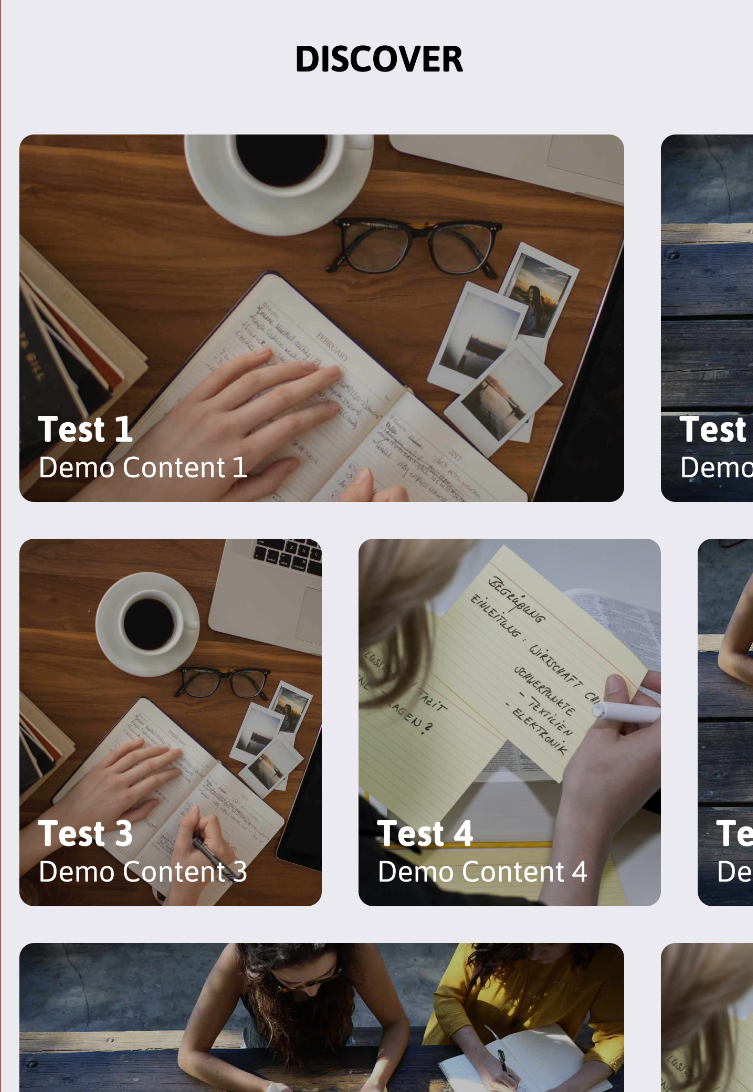
- Card
 - Image Layer (background)
 - Content/Text Layer
   - Title
   - Description
build your Component
export class Card extends React.Component {

  render() {
    const {title, description, image, full} = this.props;

    return (
      <View style={styles.container}>
        <View style={styles.imageContainer}>
          <Image style={styles.image} source={{uri: image}}/>
        </View>
        <View style={styles.contentContainer}>
          <Text style={{color:'white', fontSize: 25,}}>{title}</Text>
          <Text style={{color:'white', fontSize: 18,}}>{description}</Text>
        </View>
      </View>
    );

  }

}

Card.propTypes = {
  title: PropTypes.string.isRequired,
  description: PropTypes.string.isRequired,
  image: PropTypes.string,
}
build your Component
const styles = StyleSheet.create({
  container: {
    height: 200,
    margin: 10,
  },
  contentContainer: {
    flex: 1,
    flexDirection: 'column',
    padding: 10,
    justifyContent: 'flex-end',
    backgroundColor: 'rgba(0,0,0,0.25)',
    borderRadius: 8,
  },
  image: {
    borderRadius: 8,
    resizeMode: 'cover',
    width: '100%',
    flex: 1,
  },
  imageContainer: {
    position: 'absolute',
    top: 0,
    left: 0,
    right: 0,
    bottom: 0,
  },
});
build a custom Shape


build a custom Shape
<item
    android:width="20dp"
    android:height="20dp"
    android:top="10dp">
    <rotate
        android:fromDegrees="45"
        android:pivotX="75%"
        android:pivotY="40%">
        <shape>
            <solid android:color="#fe696d" />
        </shape>
    </rotate>
</item>

<item
    android:width="@dimen/marker_width"
    android:height="@dimen/marker_height"
    android:bottom="8dp">
    <shape>
        <solid android:color="#4b4b4b" />
        <corners
            android:topLeftRadius="@dimen/marker_corner_radius"
            android:topRightRadius="4dp" />
    </shape>

</item>


<item
    android:width="32dp"
    android:height="26dp"
    android:bottom="4dp"
    android:top="16dp">
    <shape>
        <solid android:color="#fe696d" />
        <corners
            android:bottomLeftRadius="@dimen/marker_corner_radius"
            android:bottomRightRadius="@dimen/marker_corner_radius" />
    </shape>

</item>
build a custom Shape
<Svg height={svgHeight} width={vw(100)} style={styles.headerSvg}>
  <Svg.Defs>
    <Svg.ClipPath id="clip">
      <Svg.Circle cx="50%" cy={svgHeight*2.5} r={svgHeight*2}/>
      <Svg.Rect x="0" y="0" width="100%" height="100%" fill="black"/>
    </Svg.ClipPath>
  </Svg.Defs>
  <Svg.Image
    x="0%"
    y="0%"
    width="100%"
    height="100%"
    preserveAspectRatio="xMidYMid slice"
    href={{ uri: 'http://quizium.com/static-app-img/sample1.jpg'}}
    clipPath="url(#clip)"
    />
</Svg>
How to Publish the App
generate package
- exp build:android
- exp build:ios
publish package
 - CodePush
 - Expo Publish

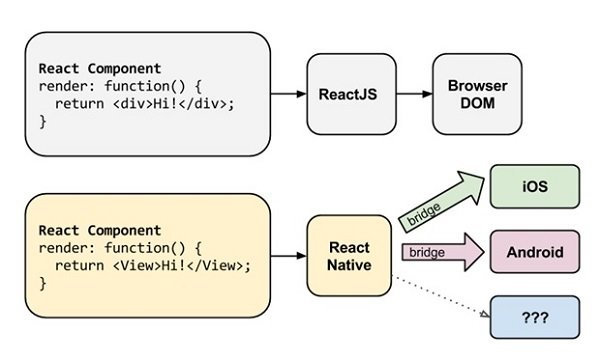
React native rendering
Native Widget
 - automatic Threads

 - abstract Layer called "bridge"
 - communicate directly with Native Render
   API
 - Bridge:
    - Java on Android
    - Objective C on iOS
    - C# on Windows
Ionic, Cordova,...
Pro
+ pure "Web-Syntax"
Con
 - within a wrapper (like webview)
    -> no native rendering,
       slower rendering
    -> single threaded
good References
http://www.awesome-react-native.com/

https://expo.io/

https://snack.expo.io/
Thank you
twitter/aFINKndreas